Omniscope now provides an optional in-memory workflow execution engine.
When enabled, the data produced while a workflow runs is stored in RAM instead of being written to files on local disk.
This affects the processing stage of Omniscope - the moment when workflow blocks execute and datasets are built or published.
In simple terms: when you press Execute, the data flowing between workflow blocks lives in memory rather than being written to disk next to the project.
By default, Omniscope writes workflow execution data to disk to ensure predictable behaviour across all environments. The in-memory mode is an advanced configuration designed for performance-oriented servers, dedicated execution nodes, and containerised deployments.
Important: Workflow Execution Engine vs Data Engine
Omniscope has two separate runtime components, used at different times.
| Component | Used for |
|---|---|
| Workflow Execution Engine | Running blocks and building datasets during workflow execution |
| Data Engine | Serving queries for dashboards, reports and visualisations after publishing |
This article concerns the workflow execution engine only.
The Data Engine is responsible for report interaction (filters, charts, dashboard queries) after a workflow has already published its results. It has its own configuration options, including an in-memory mode, and is not changed by this setting.
However, the two features can be combined:
Workflow builds the dataset in memory
Data Engine serves the dataset from memory
When both are enabled, Omniscope can operate without local disk I/O during normal operation.
Why this feature exists
Historically, ETL and BI tools relied heavily on disk because:
memory was limited
datasets often exceeded available RAM
disk storage provided safety and durability
Modern infrastructure has changed significantly:
servers commonly have tens or hundreds of gigabytes of RAM
cloud and container nodes may be ephemeral
local storage may be restricted or slow
network storage is far slower than memory
In many deployments today, disk I/O is the primary performance bottleneck, not CPU.
The in-memory workflow execution engine removes that bottleneck during workflow processing.
What actually happens during execution
When a workflow runs, each block produces data that must be stored temporarily while the next block processes it. This working data is called execution data.
Default behaviour
Normally, Omniscope:
writes intermediate block outputs to disk
reads them again for downstream blocks
stores execution data next to the project location
This allows execution to operate reliably even with limited RAM.
In-memory behaviour
With the in-memory workflow execution engine enabled:
block outputs are stored in RAM
intermediate tables remain in RAM
transformations occur in RAM
temporary execution files are not written locally
However, the data is not only kept for the duration of a single execution.
The execution data remains available inside the Omniscope process after execution completes. It is released when Omniscope is shut down.
This means the workflow does not need to rebuild intermediate data again unless the project is re-executedor the server restarts.
What still uses storage
This feature does not eliminate storage requirements. The following still need a disk or network location:
project files
configuration
schedules
published outputs
optional logs
Only the temporary working data used during execution moves to memory.
Benefits
Faster workflow execution
Memory access is significantly faster than SSD or network storage.
Typical improvements include:
faster publish times
quicker recalculation
reduced execution latency
This is most noticeable in transformation-heavy workflows.
Reduced disk I/O
The workflow no longer repeatedly reads and writes intermediate data.
This is particularly helpful when:
projects are stored on network shares
local disks are slow
storage is heavily shared
No writable local disk required
The execution node does not need persistent local storage.
This enables:
read-only servers
locked-down environments
ephemeral machines
Projects and configuration can be stored on a network location while execution occurs entirely in memory.
Container and cloud deployments
Many container environments provide limited or slow local storage.
With in-memory execution, an Omniscope node can:
start → run workflows → publish → stop
without relying on temporary files.
Dedicated execution nodes
You can create machines dedicated purely to running workflows:
nightly processing servers
publish farms
burst compute nodes
Because no temporary file setup is required, nodes begin processing immediately after startup.
Better hardware utilisation
Modern servers often have large RAM capacity and many CPU cores, but disk I/O limits throughput.
Running execution in memory allows Omniscope to make effective use of available CPU and memory bandwidth.
Typical use cases
Scheduled workflow processing servers
Kubernetes or container workers
Network-share project environments
Short-lived cloud instances
High-frequency publishing pipelines
When combined with the Data Engine in-memory mode, it also supports disk-less reporting servers.
When not to use it
This feature is not suitable for every environment.
Avoid using it when:
datasets approach available RAM
workflow sizes vary unpredictably
the machine has limited memory
the operating system frequently uses swap/pagefile
durable intermediate results are required
If the OS starts paging memory to disk, performance may be worse than the default mode.
Memory sizing guidance
Approximate memory requirement:
Peak RAM ≈ largest working dataset + transformation overhead + concurrent executions
General guidance:
Minimum: 32 GB
Recommended: 64 GB+
Large workflows: 128 GB+
Always reserve memory for:
the operating system
the Data Engine
concurrent users
Enabling the in-memory workflow execution engine
Open Omniscope Server
Go to Admin
Open Labs
Enable Workflow execution in memory engine
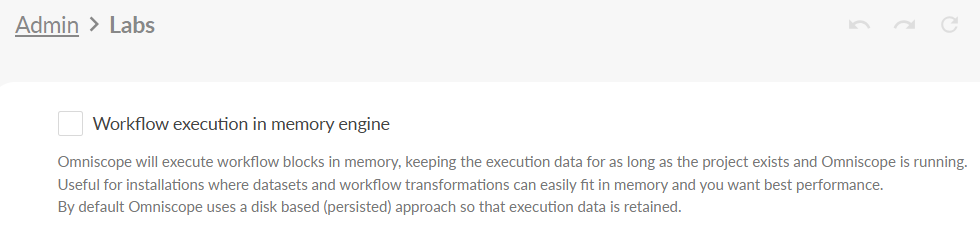
Restart the Omniscope server after enabling the setting.
Operational notes
Experimental feature
Behaviour depends on:
available RAM
workflow design
concurrency
Memory utilisation
When using the in-memory workflow execution engine, execution data is held in the server’s memory space rather than written to disk.
As a result:
a restart of Omniscope clears all in-memory execution state
the next execution must rebuild the data
memory usage may remain elevated after execution completes because data is still cached in memory
This is expected behaviour.
Swapping defeats the purpose
If the operating system uses swap/pagefile, performance will drop significantly.
If this occurs:
increase memory
reduce concurrency
or disable the feature
Does not affect report querying
Dashboard and report interaction performance is controlled by the Data Engine configuration, which is separate from this feature.
Summary
The in-memory workflow execution engine changes where workflow execution data is stored. Instead of writing temporary files to disk while blocks run, Omniscope keeps execution data in RAM for the duration of the workflow.
This reduces disk I/O and can significantly speed up dataset building and publishing.
When used appropriately - particularly on high-RAM or dedicated processing machines - it enables faster workflows and simplified infrastructure, and can be combined with the Data Engine’s in-memory mode for fully memory-resident operation.
Was this article helpful?
That’s Great!
Thank you for your feedback
Sorry! We couldn't be helpful
Thank you for your feedback
Feedback sent
We appreciate your effort and will try to fix the article