You build one report in Omniscope. You then define who should receive it and how it should be filtered.
The workflow does the rest. No duplicated reports. No manual exports.
This article describes a report-centric workflow for sending customised versions of the same report to multiple recipients, using a single report as a template and a simple scenario table to control filtering. A downloadable demo project is provided.
What this workflow does
The workflow automates per-recipient report distribution by:
treating an existing report as a reusable template,
applying filters dynamically for each recipient,
rendering the report in the correct context,
capturing a preview image of the report,
and sending that preview by email.
Each recipient receives their own filtered view of the same report.
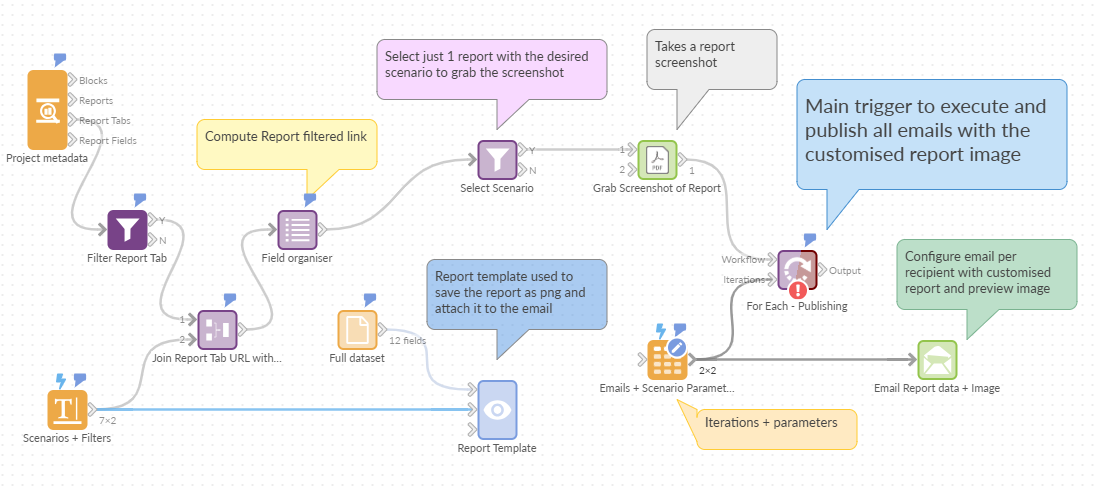
How the workflow is set up
The workflow starts by reading report and tab metadata from the current Omniscope project. This allows it to identify the report and tab to use without hard-coding URLs.
It then filters this metadata to select the target report by name. This report acts as the template for all outputs.
A separate dataset defines scenarios and recipients. Each scenario represents a context (for example a clinic, site, or tenant) and maps to one or more filter values already supported by the report.
For each scenario, the workflow computes a filtered report tab URL by injecting the relevant filter parameters. This is what allows a single report to behave like multiple personalised versions.
The workflow runs in a loop. For each recipient and scenario:
the report is rendered (behind the scenes) with the correct filters applied,
a screenshot of the report tab is captured,
and the image is used in an email sent to that recipient.
N.B. Block-level notes in the demo explain the details of each step.
Why this pattern is useful
This approach avoids:
duplicating reports,
manually exporting filtered versions,
and keeping multiple report copies in sync.
One report remains the source of truth. All customisation happens at runtime.
Demo project
A complete Omniscope demo project accompanies this article.
You can download it to:
inspect the full workflow,
read the notes on each block,
replace the demo report with your own,
and adapt the scenario logic or delivery method.
Download the demo project: https://public.omniscope.me/Public/Automation/Template-Driven-Report-Distribution.iox/
Was this article helpful?
That’s Great!
Thank you for your feedback
Sorry! We couldn't be helpful
Thank you for your feedback
Feedback sent
We appreciate your effort and will try to fix the article