This guide explains how to start with a single metric field (Value) and create visualisations of its distribution, using mean, standard deviation, Z-scores, and the normal distribution (NORMDIST) functions in Omniscope.
1. Start with your dataset
Connect a data input block to a dataset containing a numeric field, such as a performance metric, measurement, or score, then connect it to a Field Organiser block.
Here you can pick data formats for the existing fields and add new calculated formula fields.
2. Calculate the Mean and Standard Deviation
Open the Field Organiser and create new formula fields using built-in functions:
Mean =
SUBSET_MEAN([Value])Standard Deviation = SUBSET_STDDEV([Value])
NORMDIST = ([Value], [Mean], [STD], false)
For reference - regular syntax is NORMDIST(x, mean, sdev, cumulative). Gives the probability that a number falls at or below a given value of a normal distribution.
X - is the value for which you want the distribution,
mean (by default 0) - is the arithmetic mean of the distribution,
sdev (by default 1) - is the standard deviation of the distribution, the value should be positive (>0)
cumulative (by default TRUE) - is a logical value that determines the form of the function.
If cumulative is TRUE, NORMDIST returns the cumulative distribution function;
if FALSE, it returns the probability density function. In the example below this option was used.
NORMDIST(x,mu,sigma,TRUE) = NORMSDIST((x - mu)/sigma)
See also NORMSDIST function in Omniscope.
These fields provide the foundation for normalisation and probability calculations.
3. Calculate the Z-score
Create a new field in the Field Organiser using the formula:
([Value]-[Mean])
/
[STD]
This is calculated as a formula and shows how many standard deviations each value is away from the mean.
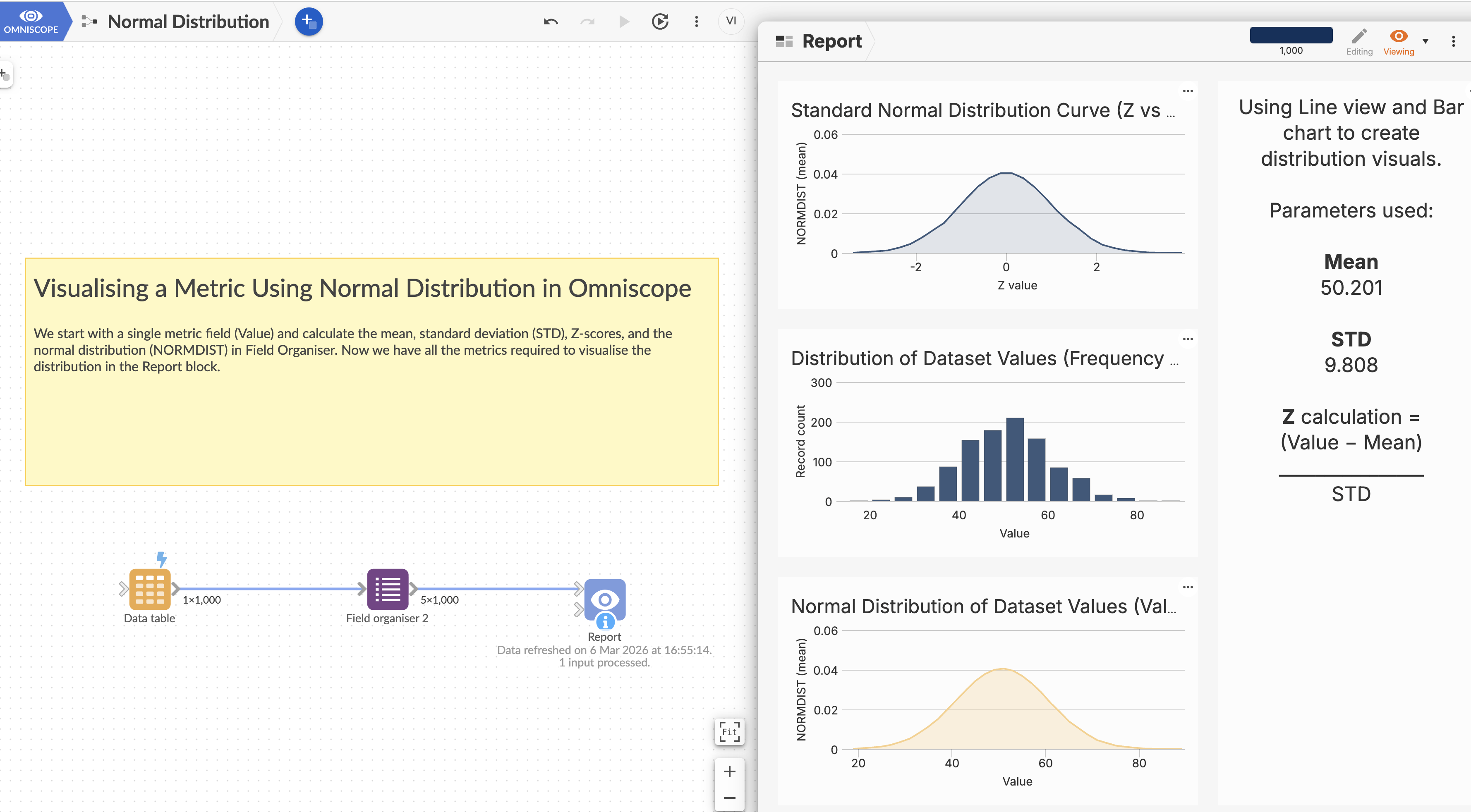
4. Visualising in Omniscope
Once your derived fields are ready, you can create several visualisations:
A. Value Distribution (Histogram / Bar Chart)
X-axis: Value, Y-axis: Record count (frequency)
B. Values vs NORMDIST (Line or Scatter Chart) - Normal Distribution of Dataset Values
X-axis: Value, Y-axis: NORMDIST
C. Standard Normal Distribution Curve; Z vs NORMDIST (Line chart - Bell Curve)
X-axis: Z, Y-axis: NORMDIST
Demo file can be downloaded for further exploration.
Was this article helpful?
That’s Great!
Thank you for your feedback
Sorry! We couldn't be helpful
Thank you for your feedback
Feedback sent
We appreciate your effort and will try to fix the article