In Omniscope, LLM-powered functionality such as the Insight Explorer is not a standalone chatbot. It is a Verification Layer built on top of our Deterministic Execution Engine.
For existing users, this means that while an LLM helps you reason and plan, the actual data processing remains visible, auditable, and grounded in the same robust logic that has powered Omniscope for 20 years.
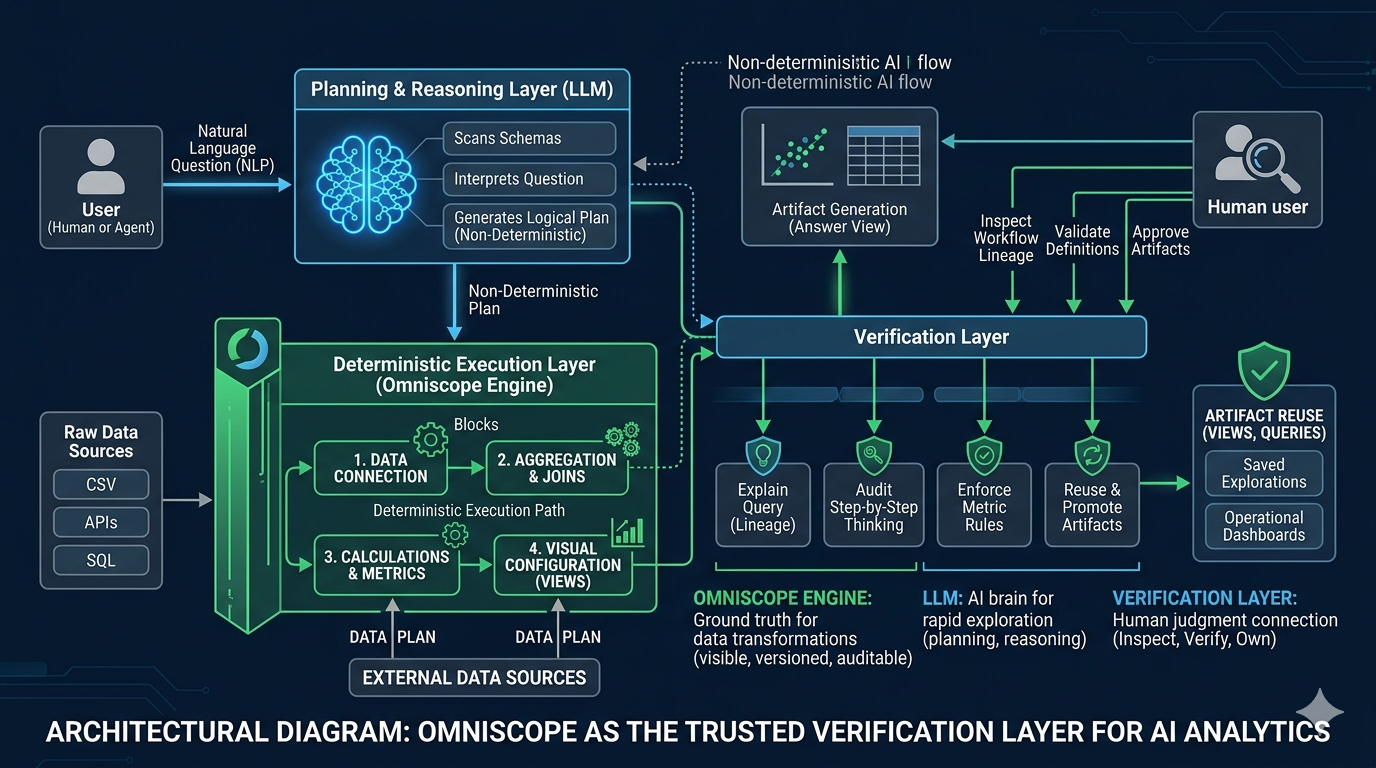
1. The Architecture of Trust
Omniscope treats the integration of Large Language Models (LLMs) as a partnership between two distinct layers:
The Planning & Reasoning Layer (LLM): The AI scans your data schemas, interprets your natural language questions, and plans the steps required to find an answer.
The Execution Layer (Omniscope): The plan is executed using Omniscope’s deterministic tools. The AI does not "calculate" the numbers in a black box; it generates the Omniscope queries and views that produce the numbers.
Why this matters: Because the AI uses Omniscope’s own tools, the results are repeatable and verifiable. If you ask the same question twice, the underlying logic remains consistent.
2. The Verification Workflow: Inspecting the Logic
Trust in AI is maintained through inspectability. Every answer generated in the Insight Explorer provides a path back to the raw data:
Activity & Explanation Sections
Every response includes a breakdown of the AI's "thinking."
Activity: Shows the specific queries executed against your data.
Explanation: Provides the step-by-step reasoning behind the chosen visualisation or calculation.
Query Lineage & "Explain Query"
Existing users can validate the AI's math by opening the Query Lineage. This tool reveals the sequence of transformations (joins, filters, and aggregations) the AI performed. You can click on any node in this lineage to see the data at that specific point in the pipeline.
3. From Answers to Artefacts: Reusability
A key functionality for power users is the ability to turn a temporary AI "answer" into a permanent Analytical Artefact.
In Omniscope, an "artefact" is a verified piece of logic or visualisation that is promoted to the report workflow.
Promote to Report: Any chart generated by the AI can be added to your report layout as a standard view.
Reuse Queries: The data transformations suggested by the AI can be saved and reused as standard logic blocks in your workflow.
Saved Explorations: Viewers can save their Q&A sessions, allowing others to revisit the verified "path to insight" without re-querying the model.
4. The Path to the Omniscope Agent
The Insight Explorer is one of the building blocks of the Omniscope Agent. Unlike generic AI assistants, this agent is domain-specific to analytics.
For Analysts: It reduces the manual labor of building dashboard mechanics, allowing you to focus on validating and framing insights.
For Data Owners: Your governed models and definitions matter more, as the Agent works directly on top of your established "Source of Truth."
5. The Verification Litmus Test
When evaluating an AI-generated insight, existing users should apply these checks to ensure data integrity:
Check the Lineage: Does the join logic match your business definitions?
Verify the Grain: Is the AI aggregating data at the correct level (e.g., per-capita vs. total)?
Inspect the Assumptions: Click on the Badges in the answer to see what filters or limitations the AI identified.
Was this article helpful?
That’s Great!
Thank you for your feedback
Sorry! We couldn't be helpful
Thank you for your feedback
Feedback sent
We appreciate your effort and will try to fix the article