Python Environment
The AI Python Block is a special Python block which lets a user create custom Python code by specifying the functionality of the block in natural language. This means that for the block to work, your Python environment needs to be setup correctly. For guidance on how to set up the Python environment please check this article: Setting up the Custom Block.
OpenAI
Disclaimer
In its current form, the AI Python Block utilises ChatGPT, an OpenAI product. ChatGPT is a service hosted on OpenAI servers, which means that certain data, like the data schema, field names, and the result of certain analyses are transmitted to OpenAI. If you work with sensitive data, please make sure this poses no problems. In the future, we will support AI services hosted directly on your machines so that you can work safely also with sensitive data.
AI setup
In order to use the AI Python block with OpenAI, you'll need to configure Omniscope with your own OpenAI API key. Follow How to enable AI in Omniscope, then configure the AI Python Block integration to use an OpenAI provider, before proceeding.
Azure OpenAI
Note: this section is out of date and refers to the Azure OpenAI service. You are better advised to follow the instructions for setting up using the Ai Foundry. See Setting up an Azure OpenAI provider.
Disclaimer
In its current form, the AI Python Block utilises Azure ChatGPT, an OpenAI product that is hosted on Microsoft Azure servers, which means that certain data, like the data schema, field names, and the result of certain analyses are transmitted to OpenAI and Microsoft. If you work with sensitive data, please make sure this poses no problems. In the future, we will support AI services hosted directly on your machines so that you can work safely also with sensitive data.
AI setup
In order to use the AI Python block with Azure OpenAI, you'll need to configure Omniscope with your own Azure OpenAI API key and model deployment. Follow How to enable AI in Omniscope, then configure the AI Python Block integration, for example to use an OpenAI provider.
Custom Blocks
The result of a successful execution of an AI Python Block is the creation of a Custom Block. Every AI Python Block functions like a Custom Block once the "Execute" button was pressed and a script was created. In AI Python blocks, the conversation can be picked up at a later time, the script changed and the block re-executed to update its functionality. If, at some point, the functionality of the block is as desired, the block can be readily duplicated and its duplicate transformed into a normal Custom Block, which can then be re-used, shared, downloaded, or modified within Omniscope just like any other Custom Block.
This can be achieved through the block's 3-dot menu:
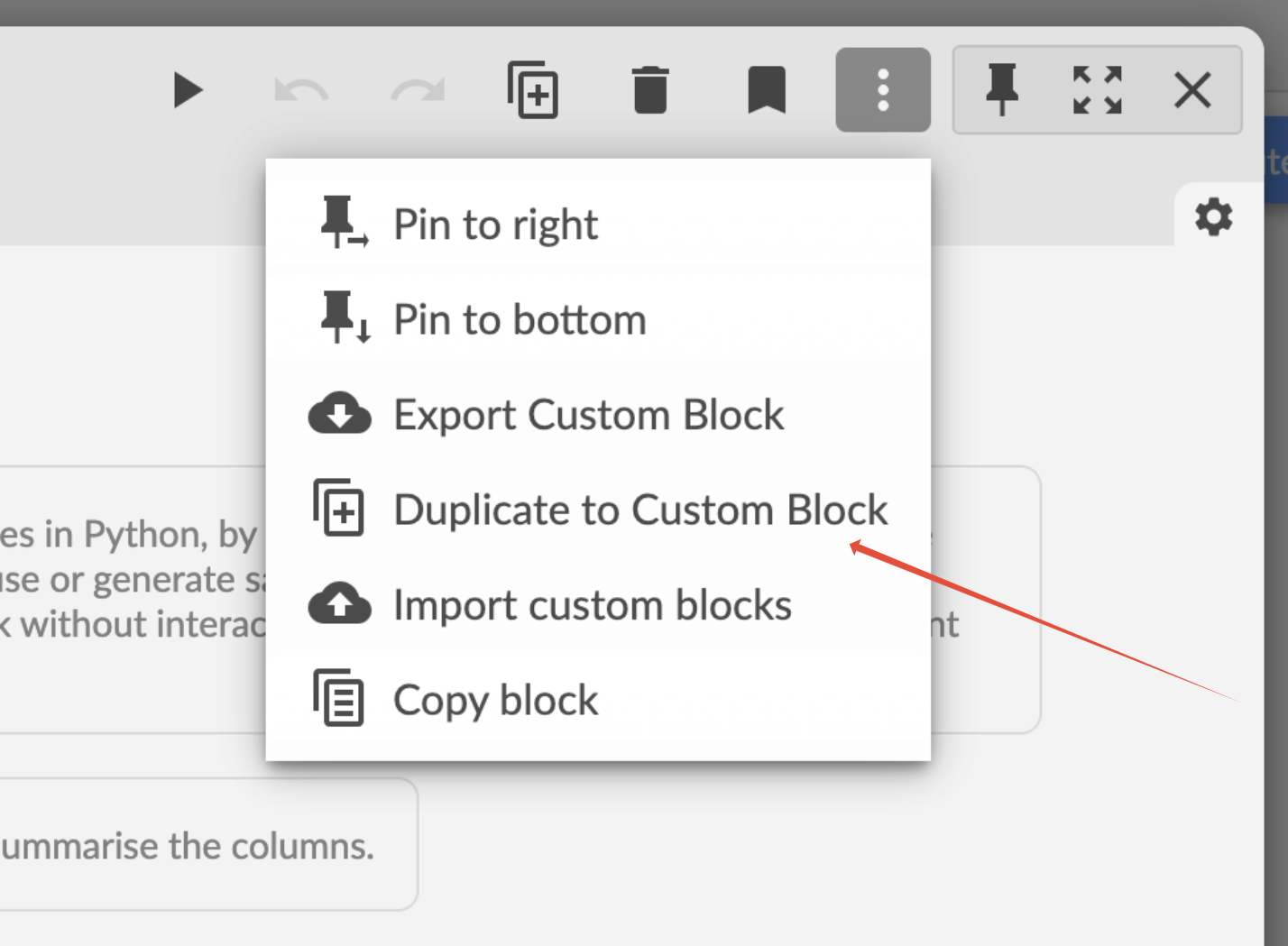
Clicking this button will not erase the AI Python Block. It will still be there, in the same place, embedded into the workflow. It will however create a new duplicated block that performs the same functionality, is a normal Custom Block, and won't have the chat history attached to it.
Was this article helpful?
That’s Great!
Thank you for your feedback
Sorry! We couldn't be helpful
Thank you for your feedback
Feedback sent
We appreciate your effort and will try to fix the article