This customer-success application came out of a few-hour experiment I ran with OpenAI Sol and Terra 5.6 in Codex. The question was practical: how far could an agent go in authoring a real data application inside Omniscope, and where would custom development still earn its place?
The result covers customers, deals, renewals and activities. SQLite is the system of record; Omniscope handles data loading, editable staging, validation, workflow execution and the visible application. Two Python Custom Blocks create and update the database, while a JavaScript Custom View turns the Report into a focused CSM interface.
You can open the working project and download its IOZ from the project menu. The records shown here are sample data, not private Visokio customer data.
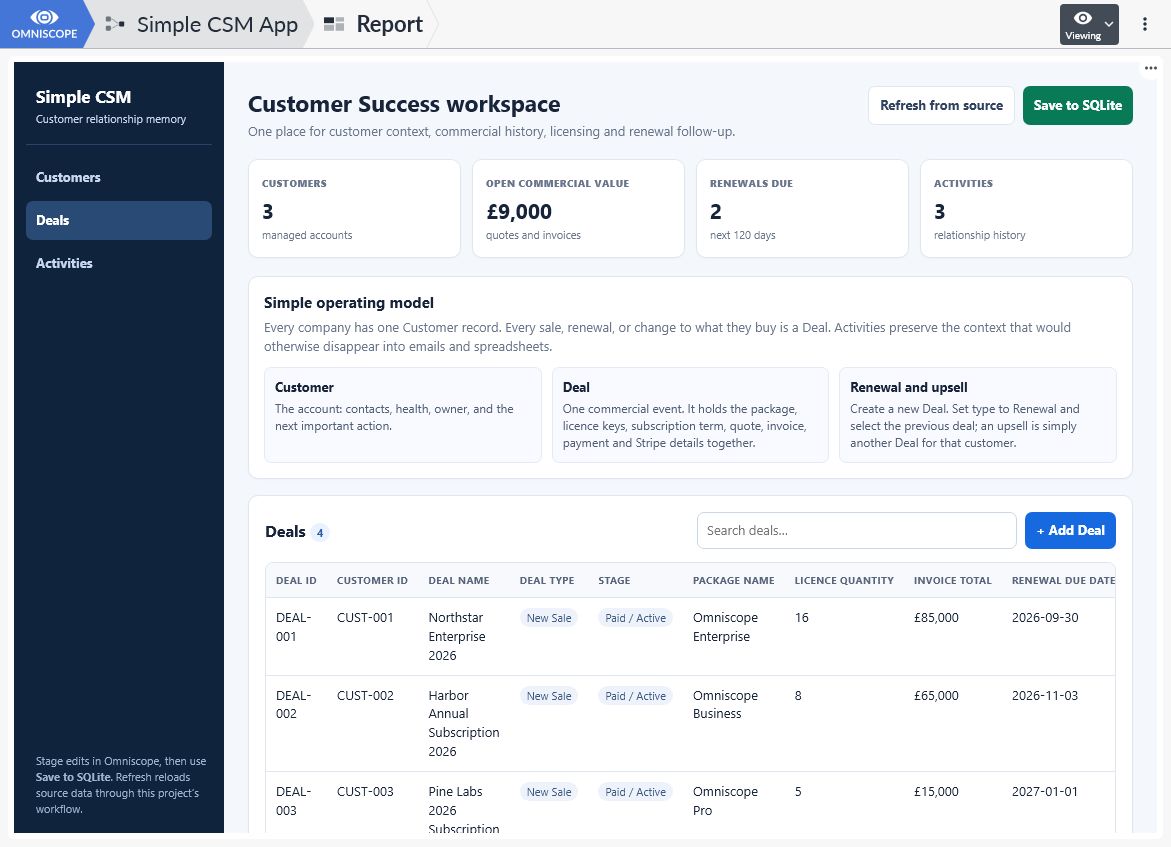
The finished Report combines customer context, commercial records, renewals and activities in one interface.
How the project is structured
The model is deliberately small. A Customer holds the account status, health, owner, primary contact and next action. A Deal records one commercial event, including its package, licences, subscription dates, quote, invoice and payment. An Activity preserves the context around a customer and, when relevant, a deal.
Renewals are Deals with Deal Type = Renewal and a link to the previous deal through Renews Deal ID. An upsell is another Deal for the same customer. The downloadable example inspected for this article contains three customers, four deals and three activities.
The workflow has five working parts:
| Part | Omniscope component | Responsibility |
|---|---|---|
| Database initialisation | Python Custom Block | Creates the SQLite schema and sample rows |
| Source loading | Three Database source blocks | Reads customers, deals and activities |
| Editable staging | Three Data Table blocks | Holds the working copy and accepts Report edits |
| Persistence | Python Custom Block | Validates and writes all three tables in one transaction |
| Interface | Report and JavaScript Custom View | Searches, adds and edits records, then runs refresh or save |
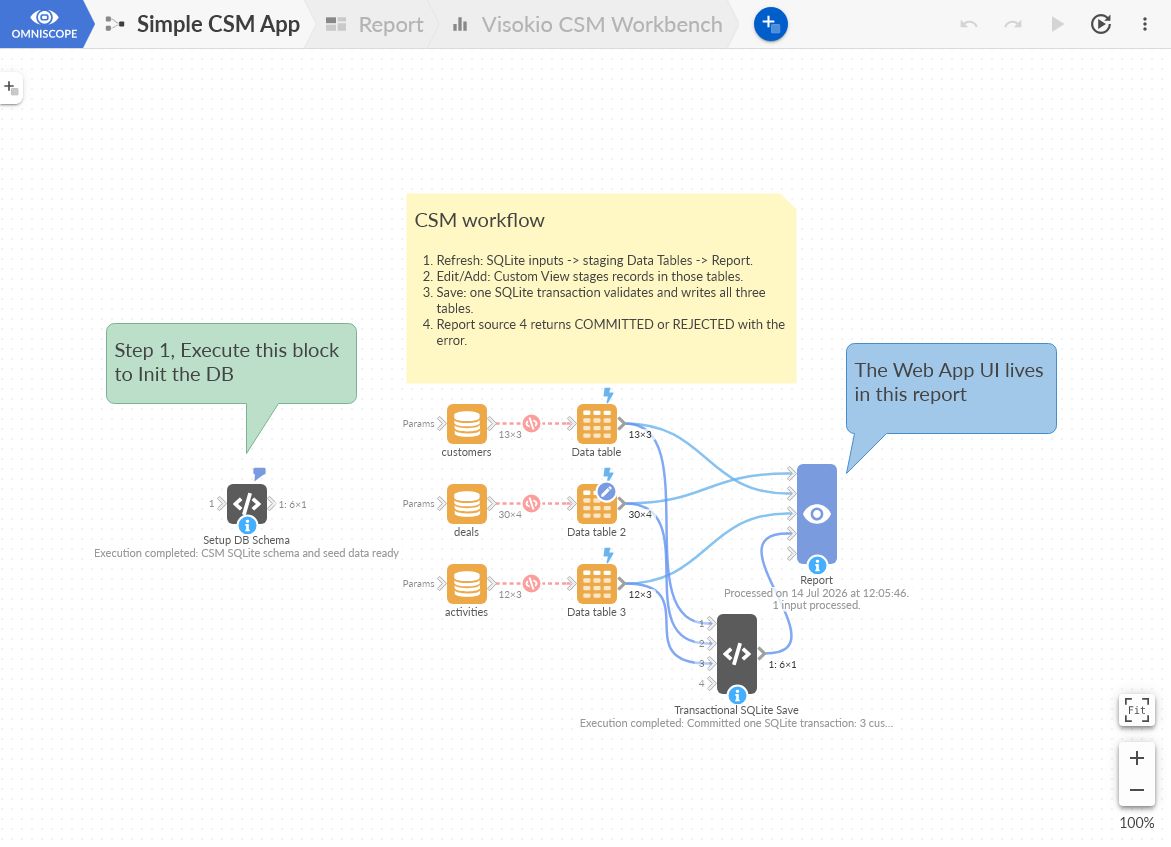
SQLite feeds three editable staging tables. The Report reads those tables and the save-status output; the transactional block writes approved changes back to SQLite.
A form edit changes an Omniscope staging table first. SQLite changes only when the user selects Save to SQLite and the complete staged model passes validation. The Report receives the save block's status output, so it can show COMMITTED or REJECTED with the actual error.
Download and configure the example
Open the Simple CSM App, select the project menu in the upper-right corner and choose Download IOZ file. You can include the last Report data and project history; passwords are not needed for this example.
The IOZ contains the project and its staged/report data, but not the SQLite database. After importing it into your Omniscope installation:
- Open Setup DB Schema and set
database_pathto a localSimple CSM.sqlitefile. - Set the same path in Transactional SQLite Save.
- Point the
customers,dealsandactivitiesDatabase source blocks to that file. - In the Report's View Designer, edit Visokio CSM Workbench and change the
PROJECTconstant to the path of your imported project. - Execute Setup DB Schema once, then refresh from source.
The hard-coded project path is one prototype limitation. A more portable implementation should derive its endpoints from the Custom View context where possible or keep the path in one configurable value.
Create the database and staging layer
Add a Python Custom Block named Setup DB Schema, with a File option called database_path and one tabular output. The script creates three tables:
customers, keyed bycustomer_id;deals, keyed bydeal_idand linked to a customer;activities, keyed byactivity_idand linked to a customer and, optionally, a deal.
The database constrains statuses and types, prevents negative commercial amounts, checks subscription dates and applies two important relationship rules. An Activity linked to a Deal must use the same customer. A Renewal must identify the prior Deal. The setup script uses CREATE ... IF NOT EXISTS and INSERT OR IGNORE, so it can be run again without duplicating the sample records.
Next, add three SQLite Database source blocks and select one table in each. Keep Execution as the connectivity mode, then connect every source to its own Data Table block.
Enable Editable and Persisted, with refill behaviour set to Replace existing data.
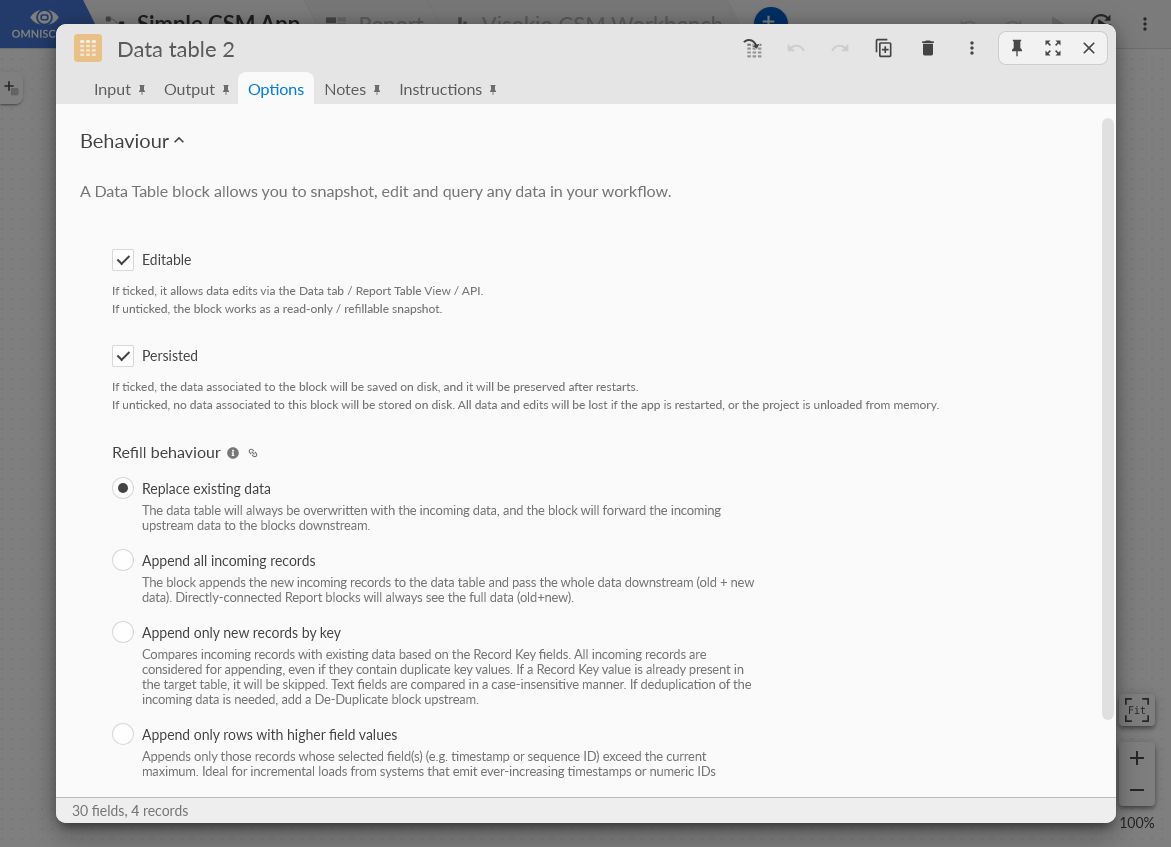
The Data Tables are the working copy. They accept edits from the Report and can be reconstructed from SQLite with Refresh from source.
That replacement behaviour has a consequence: refreshing discards changes that have been staged but not committed. A multi-user application should add stronger dirty-state and confirmation handling.
Save all three tables in one transaction
Add a second Python Custom Block named Transactional SQLite Save. Connect Customers, Deals and Activities as inputs 0, 1 and 2, then add the same database_path File option and one result output.
The block checks the complete staged model before opening the transaction. It detects duplicate IDs, missing required values, unknown customers or deals, invalid renewal links, customer mismatches and invalid quantities or amounts.
The persistence core remains small:
validate(customers, deals, activities) connection = sqlite3.connect(str(Path(database_path)), timeout=30)
try:    connection.execute("PRAGMA foreign_keys = ON")    connection.execute("BEGIN IMMEDIATE")    upsert(connection, "customers", CUSTOMER_COLUMNS, "customer_id", customers)    upsert(connection, "deals", DEAL_COLUMNS, "deal_id", deals)    upsert(connection, "activities", ACTIVITY_COLUMNS, "activity_id", activities)    connection.commit() except Exception:    connection.rollback()    raise finally:    connection.close()
New primary keys are inserted and existing ones are updated. Customers, deals and activities share one transaction, so a bad Activity cannot leave the other two tables half-updated.
The block emits COMMITTED with the written-row counts on success. On failure it emits REJECTED, the error and zero written rows. The Python Custom Block API then makes that result available to the Report.
(The custom blocks code is available on the online project, linked at the end of the article).
Build the Report and custom interface
Connect four inputs to the Report in this order: Deals, Customers, Activities and the transactional-save status. The Report Data Model exposes each source through a Query endpoint.
In View Designer, create a new view, Visokio CSM Workbench , and adapt the simple template making sure to load the Custom View API:
<div id="app"></div> <script src="/_global_/customview/v1/omniscope.js"></script>The view uses omniscope.query.builder(endpoint) to read the staging tables. It renders the navigation, four metrics, searchable tables and add/edit forms. Date and number inputs follow the schema, while controlled lists handle statuses and types. Browser-side validation gives a quick response, but the Python and SQLite checks remain authoritative.
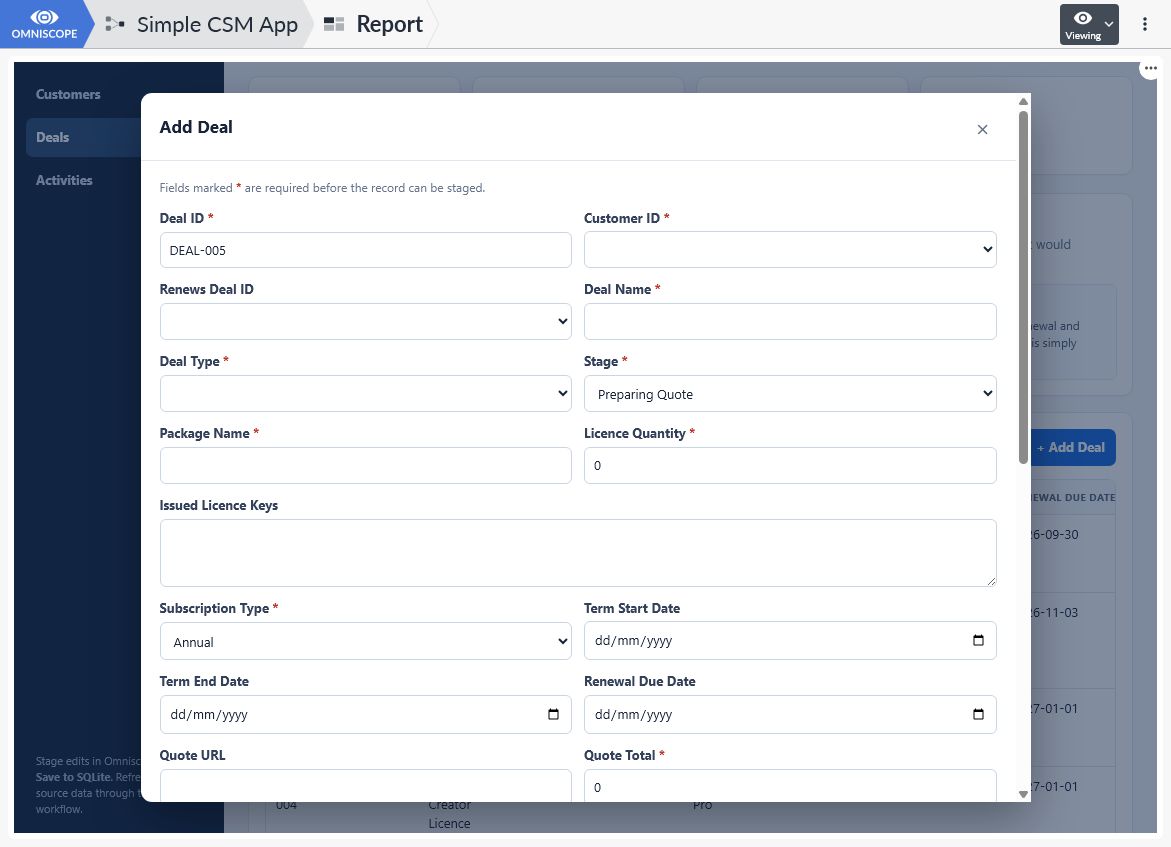
The form stages a new Deal in the editable Omniscope Data Table. The database is unchanged until the separate save operation succeeds.
Edits are posted to the Data Table Query API at /v1/edit. Refresh from source runs the SQLite sources, staging tables and Report with refreshFromSource: true. Save to SQLite runs only the transactional block and Report with refreshFromSource: false; refreshing here would erase the staged changes just before saving them.
The view polls the workflow job, reads the fourth Report source and reports success only when the transaction returns COMMITTED. The Omniscope APIs overview, Query API guide and Workflow REST API document the underlying APIs.
(The custom view code is available on the online project, linked below)
Keep the prototype boundary visible
This is a working internal prototype, not a production release. A production application still needs appropriate authentication and permissions, secrets handling, backups, concurrency testing, monitoring, recovery procedures and a maintained test suite. SQLite must also match the number of writers and the importance of the data.
The useful result was more than a generated codebase. I could review the workflow, staging behaviour, validation, forms, Report configuration and database transaction. AI authored a substantial part of the system; human judgement still defined the problem, reviewed the result and kept the production boundary honest.
Open the public Simple CSM App, download it and inspect the pieces directly. The architecture is easier to understand when you can follow one record from SQLite to the form and back again.
Was this article helpful?
That’s Great!
Thank you for your feedback
Sorry! We couldn't be helpful
Thank you for your feedback
Feedback sent
We appreciate your effort and will try to fix the article